If you’re self-employed in Canada — whether you’re a hairdresser, personal trainer, or Airbnb host — your receipts are the foundation of every tax deduction you claim. The Canada Revenue Agency (CRA) doesn’t take your word for it — they want documentation. Here’s exactly what you need to know to stay compliant and avoid problems during an audit.
What Makes a Receipt Valid for CRA Purposes
Not every piece of paper qualifies as a receipt in the CRA’s eyes. A valid receipt must include:
- Date of the transaction
- Name and address of the vendor
- Amount paid (including taxes)
- Description of the goods or services purchased
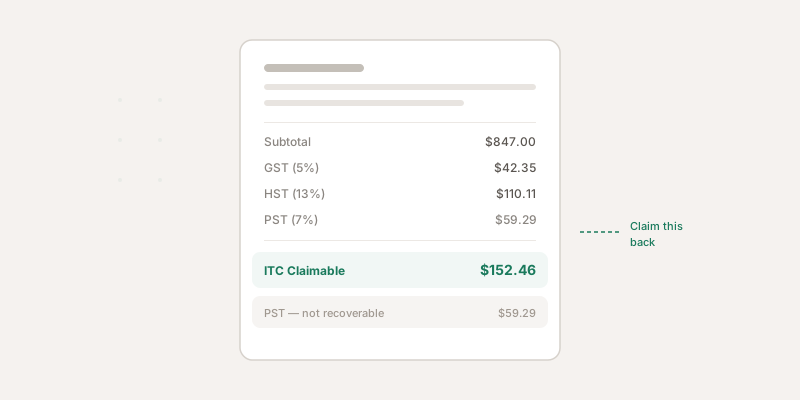
- GST/HST registration number (required on purchases over $30 before tax; for purchases under $30, the vendor’s registration number is not mandatory) — see our guide on GST/HST input tax credits for more on ITC documentation tiers
A vague credit card slip that just says “$47.50” with no vendor name or description won’t cut it. The CRA needs enough detail to verify that the expense was real and business-related.
What About Credit Card and Bank Statements?
This is one of the most common misconceptions. Bank and credit card statements alone are not sufficient to support a deduction. They show that a payment was made, but they don’t prove what was purchased or that it was a business expense.
Statements can serve as supporting documentation alongside a detailed receipt — but they can never replace an itemized receipt on their own.
Digital vs Paper Receipts: What CRA Actually Accepts
Good news: the CRA has fully accepted electronic records for years. According to their electronic record-keeping guidelines, digital receipts are valid as long as they:
- Are legible and complete (all required fields present)
- Are stored in an accessible electronic format (PDF, image files, etc.)
- Can be provided to the CRA on request
- Have not been altered after the fact
This means photos of receipts taken with your phone are perfectly acceptable — as long as the image is clear and complete. You don’t need to keep the paper original if you have a proper digital copy.
When you scan or photograph a receipt, make sure the image captures the full receipt including the date, vendor details, and line items. A blurry photo that cuts off the bottom is as good as not having a receipt at all.
The 6-Year Retention Rule
The CRA requires you to keep all business records and supporting documents for six years from the end of the last tax year they relate to.
So if you file your 2025 tax return in April 2026, you need to keep those 2025 receipts until at least the end of 2031. If you filed late, filed an objection, or the CRA reassessed you, the retention period may extend beyond 6 years. In cases of suspected fraud, there is no time limit at all.
When Does the Clock Start?
The 6-year period begins at the end of the tax year the records relate to — not the date of the transaction:
| Transaction Date | Tax Year | Keep Until End Of |
|---|---|---|
| March 15, 2025 | 2025 | 2031 |
| November 3, 2026 | 2026 | 2032 |
| January 10, 2025 | 2025 | 2031 |
If you’re ever audited, the CRA can go back further in certain circumstances (fraud, for example). When in doubt, keep records longer.
What Happens Without a Receipt During an Audit
If the CRA audits you and you can’t produce a receipt for a claimed deduction, the outcome depends on the situation:
- Small, routine expenses — The auditor may accept the deduction if you can provide alternative evidence (bank statements, calendar entries showing business purpose, etc.)
- Large or unusual expenses — Without a receipt, the deduction will almost certainly be denied. This is especially true for motor vehicle expenses and travel expenses, which the CRA scrutinizes closely.
- Pattern of missing receipts — If you can’t produce documentation for many deductions, the CRA may deny the entire category of expenses and potentially apply penalties
The CRA can also apply gross negligence penalties — 50% of the additional tax owing — if they determine you knowingly made false statements or omissions on your return. Note that gross negligence requires more than simple carelessness; it applies to situations involving intentional disregard or recklessness.
The bottom line: the cost of keeping receipts organized is trivially small compared to the cost of losing deductions in an audit.
Common Mistakes to Avoid
Relying on bank statements alone. As mentioned, these don’t prove what you bought or why.
Keeping credit card receipts instead of itemized receipts. The credit card slip shows “$85.00 at Staples” — but the itemized receipt shows you bought printer ink, paper, and a USB cable (categorized as office expenses). Only the itemized version proves the business purpose.
Letting thermal receipts fade. Thermal paper (the shiny kind from most retail stores) fades to blank within a year or two. Scan or photograph these immediately.
Not recording the business purpose. For expenses that could be personal or business (like a lunch), note the business purpose at the time — who you met with and what you discussed. The CRA won’t accept “lunch” as a meals and entertainment business expense without context.
Mixing personal and business expenses. Use a separate business bank account and credit card. It makes tracking dramatically easier and looks much better to an auditor.
How to Stay Organized
The simplest system that works is the best system. Here’s what we recommend:
- Capture receipts immediately — Don’t let them pile up. Photograph or scan each receipt as you get it.
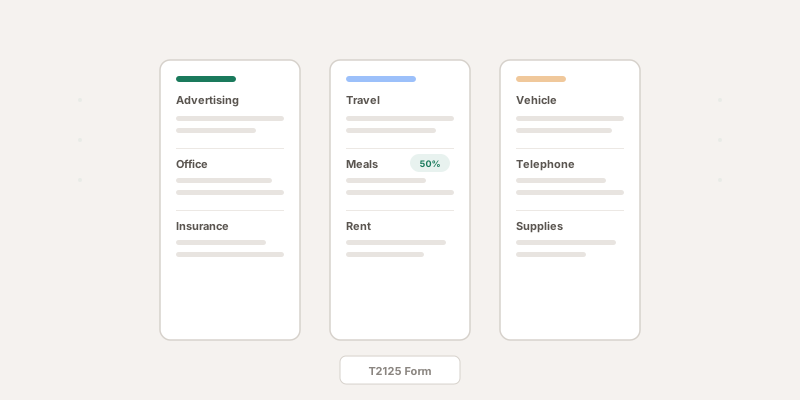
- Categorize as you go — Assign each receipt to the correct T2125 expense category right away.
- Store digitally with backups — Keep digital copies in at least two places.
- Review monthly — Spend 15 minutes each month making sure nothing slipped through the cracks.
This is exactly what ScanForTax is built to do. Snap a photo of your receipt, and our AI extracts the vendor, amount, date, tax breakdown, and expense category automatically — then stores everything in a CRA-compliant digital format. No more shoeboxes, no more faded thermal paper, no more scrambling at tax time.
Key Takeaways
- Every receipt needs a date, vendor name, amount, item description, and GST/HST number
- Digital photos and scans are fully CRA-compliant
- Keep records for 6 years from the end of the relevant tax year
- Bank statements support but don’t replace itemized receipts
- Missing receipts during an audit means lost deductions and potential penalties
Getting your receipt system right isn’t glamorous, but it’s one of the highest-ROI habits for any self-employed Canadian. Every receipt you capture is a deduction you can defend. Explore all T2125 expense categories to make sure you’re not missing any eligible deductions.
This article is for informational purposes only and does not constitute legal, financial, or tax advice. Tax rules change frequently — always verify current CRA requirements at canada.ca and consult a qualified tax professional for advice specific to your situation.